We’ve just released Server Check v1.2.20201026 which adds a few new features that offer greater convenience and easier, quicker management by system admins:
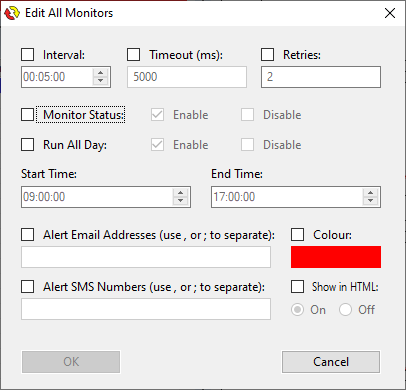
- We’ve added a new bulk monitor editing panel to allow changes to be made to all or multiple selected monitors at once, and we’ve removed the individual bulk email and SMS edit options as the new panel includes these options.
- An optional “Auto Unpause” setting is now available and can be configured via the settings panel. This allows a paused system to be automatically unpaused after specified time, which is great if you pause Server Check and forget to unpause it! This new feature is optional, and is disabled by default.
- We’ve made the monitor edit window sizes consistent between monitor types – previously when you scrolled through the edit window for your monitors you may have found that the windows bounced around a bit, but we’ve fixed them all at the same size now.
- Some improvements have been made to behind-the-scenes handling of licensing server connection failures, but remember that Server Check still requires internet access to keep your license valid and to check for software updates.
- We’ve fixed some issues and conflicts with some anti-virus software. Any virus alerts that previous versions of Server Check were causing were, of course, false – Server Check is not malicious software and contains nothing untoward. However we noticed some false positives in certain anti-virus environments so we’ve fixed that.
- A runtime error caused by the tray icon at program launch has also been fixed – this was very intermittent but would cause Server Check to terminate when it occurred.
If you already have Server Check installed, you can update your software right now in the Help menu of the main program panel.
Want to give these latest features a try? If you’re not already a Server Check user, you can get a FREE lifetime license to monitor up to 10 monitors – it will never expire! Download Server Check right away – it only takes five minutes to install and get going!